
ViewLayer Manager
ShippedWhat Is It
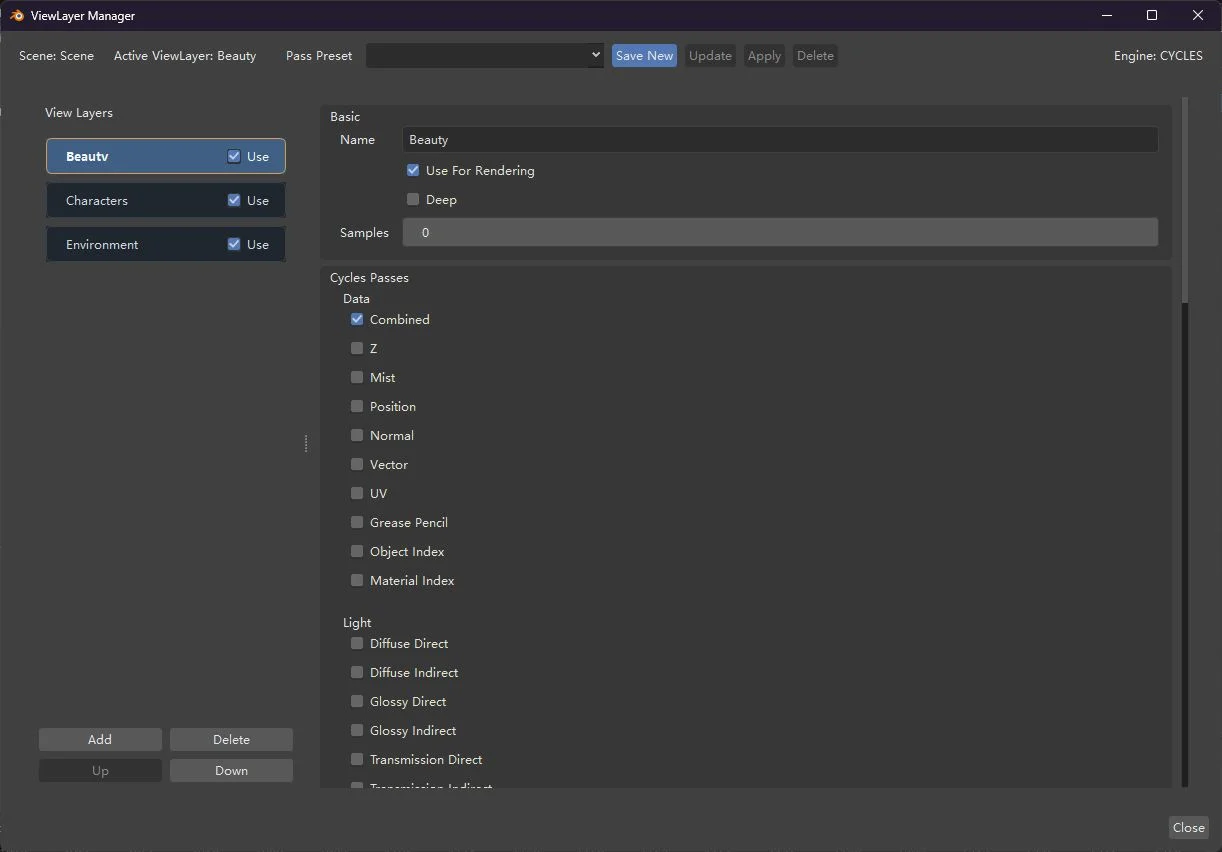
The ViewLayer Manager is a dedicated Qt-based tool window that provides a comprehensive interface for managing ViewLayers, render passes, Shader AOVs, lightgroups, and Cycles light-pass AOV controls — all from a single, organized panel outside of Blender's native properties editor.
It is built on BQt and ships as a bundled Blender System Extension.
Why Use It
- Centralized management — All ViewLayer-related settings in one window instead of scattered across multiple property panels.
- Preset system — Save and apply pass configurations as presets across multiple ViewLayers at once.
- Batch operations — Select multiple ViewLayers in the left list and apply presets to all of them simultaneously.
- Organized pass display — Passes are grouped into logical categories: Data, Light, Shader, and Effects/Utility.
- Multi-language UI — The manager interface supports Simplified Chinese, Traditional Chinese, and French translations.
How To Launch
- Look at the top-right header bar in Blender, next to the native
ViewLayerselector. - Click the ViewLayer Manager button.
- The manager opens as a standalone Qt window.
INFO
On first click, the bundled BQt runtime extension is automatically enabled for the current session. You do not need to manually enable any extensions.
Manager Window Layout
Left Panel — ViewLayer List
- Lists all ViewLayers in the current scene.
- Inline Use For Rendering toggle per ViewLayer.
- Up / Down buttons for reordering ViewLayers.
- Multi-select support for preset application.
- Create, rename, and delete ViewLayers directly.
Right Panel — Detail Pane
Edits the currently selected ViewLayer with sections for:
Passes
Organized in Blender-native subgroups:
| Group | Contents |
|---|---|
| Data | Combined, Z, Mist, Normal, Position, Vector, UV, Object Index, Material Index, etc. |
| Light | Diffuse (Direct/Indirect/Color), Glossy, Transmission, Volume, Emission, Background, Shadow, Ambient Occlusion |
| Shader | Shader AOV entries |
| Effects / Utility | Denoising data, Sample Count |
Cryptomatte
Dedicated section for Cryptomatte pass settings (available for both Eevee and Cycles).
Deep
ViewLayer-level Deep EXR property (intentionally English-only label).
Shader AOV
Single-column list for managing custom Shader AOV entries.
Light Groups
Manage lightgroups assigned to the current ViewLayer.
Cycles Light Pass AOVs
Enable and configure per-lightgroup lobe pass output:
- Diffuse (Direct / Indirect)
- Glossy (Direct / Indirect)
- Transmission (Direct / Indirect)
- Volume (Direct / Indirect)
Preset Toolbar
- Save — Save the current ViewLayer's pass settings as a named preset.
- Update — Update an existing preset with the current settings.
- Apply — Apply a preset to all currently selected ViewLayers in the left list.
- Delete — Remove a preset.
Presets are stored as JSON files in the user's local Blender extension resources directory.
Engine-Aware Visibility
The manager automatically shows/hides sections based on the current render engine:
| Section | CYCLES | EEVEE |
|---|---|---|
| Eevee Passes | ❌ | ✅ |
| Cycles Passes | ✅ | ❌ |
| Light Groups | ✅ | ❌ |
| Cycles Light Pass AOVs | ✅ | ❌ |
| Shader AOV | ✅ | ✅ |
Live Write-Back
Property changes in the manager are written back to Blender immediately — there is no separate "Apply" or "Refresh" step for normal property editing. The manager re-syncs when it is shown and when it regains focus.
Known Behavior
- The manager runs as a standalone top-level Qt window (not embedded in Blender's UI).
- The BQt runtime may log
failed to get blender hwnd, creating new window— this is expected behavior in the safe-mode path and is not a launch failure. - Windows only in the current release. Linux support is deferred.
See Also
- Python Operators (API) —
wm.blender_vfx_viewlayer_manager_showoperator reference. - Lightgroup Lobe Passes — The lobe passes controlled by the manager's Cycles Light Pass AOVs section.
- Blender Manual: View Layers — Standard Blender ViewLayer documentation.