
Blender VFX Pipeline for Studios: Native Deep EXR, Overscan & Production Render Handoff
Adopting Blender in a real VFX studio rarely fails at modeling or viewport lookdev—it breaks down at render data handoff. Without native Deep EXR compositing, standard overscan padding, per-light direct/indirect passes, and matching cross-software color transforms, shots get stuck in manual holdout mattes and full-frame re-renders between Blender and Nuke.
Industrial CG Platform 5.2.4 LTS builds these missing production capabilities directly into Blender 5.2's Cycles renderer and runtime (Windows x64 stable; public Linux Beta 1 pre-release available for testing), paired with open-source companion tools that connect cleanly to Foundry Nuke, Autodesk Maya, and SideFX Houdini.
1. What a Production Blender VFX Pipeline Actually Requires
A studio shot pipeline moves through six connected stages: Plates & Camera Tracking → Layout & Assets → Lighting & Render Layer Setup → Cycles Rendering & EXR Handoff → Nuke Compositing → Color & Final Delivery.
Where Industrial CG Platform fits—and what it does not try to replace:
- Versus stock Blender 5.2: Stock Blender provides strong modeling, animation, and Cycles path-tracing foundations, but lacks native Deep EXR output, standard camera overscan rendering, per-light direct/indirect passes, and a multi-layer batch pass manager. Industrial CG Platform adds these directly at the renderer level while keeping full
.blendcompatibility. - Versus shot, version, and asset managers (such as Blender_Plumber, Kitsu, or ShotGrid): Pipeline trackers manage tasks, file versions, and plate ingestion. Industrial CG Platform focuses on rendering, pass organization, EXR data handoff, and color consistency—complementing existing studio trackers rather than replacing them.
2. Platform Architecture: What Each Module Solves
[Plates & Color]   -> [Blender Layout / Lighting] -> [Cycles 5.2.4 LTS Render] -> [Nuke Comp & Delivery]
  Shared Color Config  Multi-Layer Pass Manager       Native Deep EXR              DeepRead / DeepMerge
  (AIO-OCIO)           Per-Light Shadow Tinting       Camera Overscan (EXR)        One-Click Light Rebuild
Per-Light Passes Automated EXR Export Matching Color Views| Pipeline Stage | Core Feature / Companion Tool | What It Solves in Production | Target Software |
|---|---|---|---|
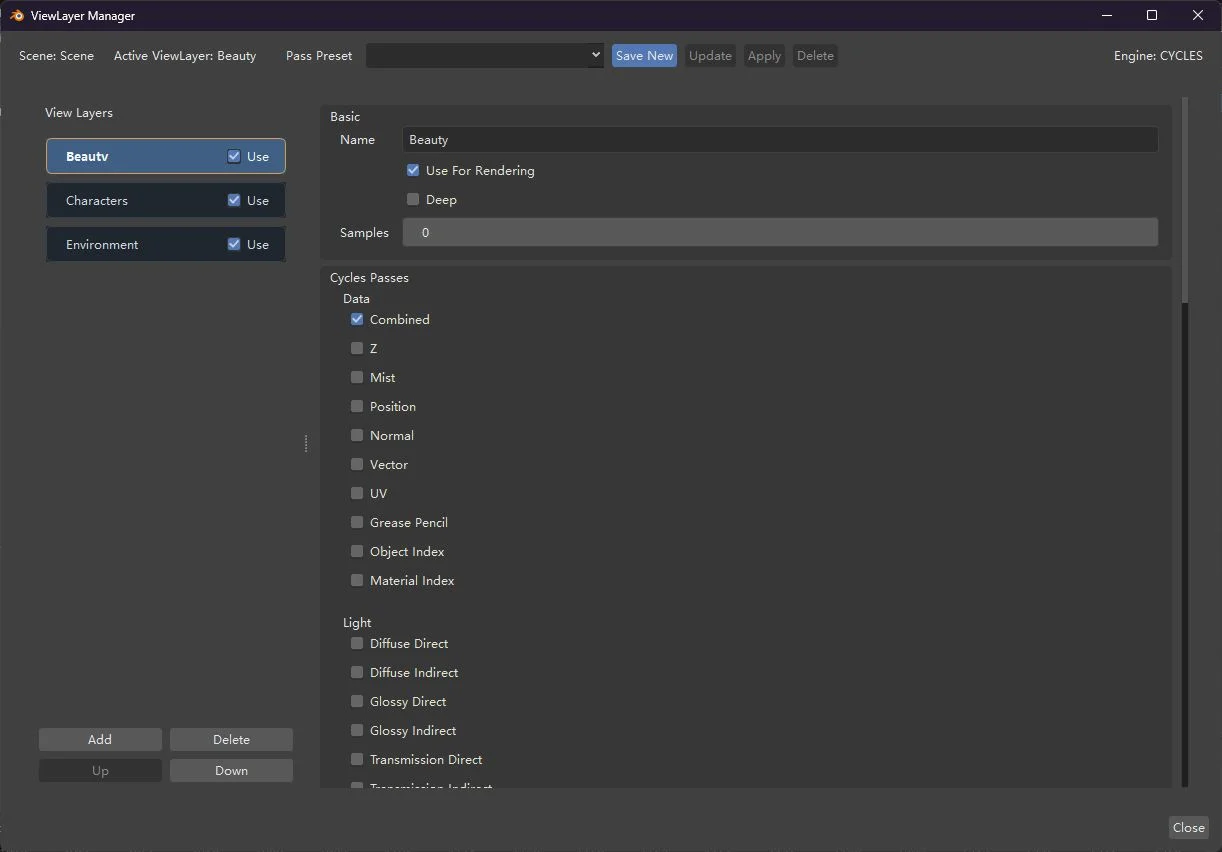
| Scene & Layer Control | Multi-Layer Pass Manager (ViewLayer Manager) | Standalone window to organize ViewLayers, render passes, custom AOVs, and lightgroups with one-click batch presets | Blender (built-in) |
| Artistic Lighting | Per-Light Shadow Tinting (Shadow Color) + Per-Light Passes | Tint individual light or world shadows freely, and split each lightgroup into direct/indirect diffuse, glossy, transmission, and volume passes | Blender Cycles |
| Deep & Overscan EXR | Native Deep EXR + Camera Overscan (EXR Overscan) | Multi-sample 3D depth EXRs (lightweight Simple & Physical modes) plus extra outer pixel margins for lens distortion without altering the delivery crop | Blender Cycles → Nuke |
| Automated EXR Export | Automated EXR Export (Industrial AOV Connector) (5.3.0) | Auto-builds multi-layer output trees separating Beauty, Deep, Cryptomatte, and geometry data, wires denoising, and disables redundant default renders | Blender → Nuke |
| Stock-Blender Light Split | Stock-Blender Light Splitter (Industrial Light AOV Splitter) | Lets teams still rendering on stock Blender split lightgroups into diffuse, specular, transmission, and volume passes | Blender → Nuke |
| Nuke Light Rebuild | One-Click Nuke Light Rebuild (Auto Light Shuffle) | Rebuilds Blender lightgroup EXRs in Nuke into a balanced relighting node tree with labelled backdrops and preserved alpha | Foundry Nuke |
| Cross-Software Color | Shared Color Config (AIO-OCIO) | Keeps AgX, Filmic, ACEScg, and camera log views visually identical across Blender, Nuke, Maya, and Houdini | Blender, Nuke, Maya, Houdini |
3. Who It Is Built For
| Role | Common Blender Bottleneck | How Industrial CG Platform Helps |
|---|---|---|
| VFX Supervisors & Studio Leads | Small late-stage asset or lighting notes trigger expensive full-shot re-renders | Native Deep EXR holdouts and per-light passes absorb most changes directly inside Nuke without re-rendering untouched layers |
| Pipeline TDs | Maintaining fragile scripts for EXR padding, AOV routing, and cross-software color mismatches | Built-in standard EXR Overscan, documented scripting APIs (RNA/C++), isolated OptiX cache, and unified AIO-OCIO configs |
| Lighting Artists | Repetitive pass toggling across dozens of layers and limited artistic light control | Batch presets in the Multi-Layer Pass Manager, per-light direct/indirect passes, and per-light shadow tinting |
| Compositors (Nuke) | Black edges during lens distortion, missing deep slices in smoke/fur, and manual Shuffle wiring | Automatic overscan bounding boxes, native DeepRead/DeepMerge support, and one-click lightgroup tree rebuilding |
4. Studio Evaluation & Pilot Checklist
You can pilot Industrial CG Platform 5.2.4 LTS on a single real shot without touching your existing Blender setup:
- Verify workstation baseline (see Installation):
- OS: Windows 10/11 x64 portable ZIP for the current stable 5.2.4 LTS release. (A public Linux Beta 1 pre-release built on Rocky Linux 8.10 is available for testing and feedback, not yet qualified as stable.)
- GPU: NVIDIA RTX GPU with OptiX (recommended); CPU rendering is always available.
- Memory & Storage: 16 GB RAM minimum (32 GB+ recommended for multi-layer Deep EXR), ~1 GB extracted disk space.
- Deploy side-by-side with stock Blender: Extract the portable ZIP to any writable folder (e.g.,
D:\Tools\IndustrialCGPlatform\). The window title clearly displaysBlender 5.2.4 LTS Industrial CG Platform, and the default OptiX shader cache is isolated automatically so existing installs stay untouched. - Validate
.blendinteroperability: Open an existing Blender 5.2 production file, turn on Deep EXR, Overscan, and per-light passes on a test shot, save, and verify the file still opens cleanly in stock Blender 5.2 (extra properties are preserved and safely ignored). - Test the full Nuke round-trip: Verify overscan framing in Nuke
Read, 3D depth merging viaDeepRead→DeepMerge, and one-click light reconstruction via Auto Light Shuffle.

5. One Shot from Plates to Final Composite (High-Level Walkthrough)
A typical VFX shot moves through six documented steps:
- Lock Color Pipeline — Deploy Shared Color Config (AIO-OCIO) across Blender, Nuke, Maya, and Houdini so plates and CG match identically.
- Structure Render Layers — Split environment, props, hero assets, and geometry data layers using Multi-Layer Pass Manager presets.
- Configure Deep EXR & Overscan — Enable Native Deep EXR (Simple or Physical mode, VRAM budget) and Camera Overscan (EXR Overscan) margins for lens distortion.
- Enable Per-Light Passes — Split key, fill, rim, and environment lights into direct and indirect passes via Per-Light Passes.
- Automate EXR Export — Generate separated Beauty, Deep, Cryptomatte, and geometry data output trees with Automated EXR Export (Industrial AOV Connector).
- Composite in Nuke — Merge 3D depth layers (
DeepRead→DeepMerge→DeepToImage) and rebuild lightgroups with One-Click Nuke Light Rebuild (Auto Light Shuffle).
For concrete panel settings, Nuke node chains, naming rules, and troubleshooting, follow our dedicated hands-on guide: Blender to Nuke Workflow.
6. How Industrial CG Platform Differs from Stock Blender
Industrial CG Platform stays close to upstream Blender 5.2 LTS so studios keep their existing add-ons, Python tools, and .blend assets working without friction. Rather than changing Blender's workflow or file format, it adds renderer-level capabilities that Python add-ons alone cannot provide—native Deep EXR, standard camera overscan rendering, per-light direct/indirect passes, per-light shadow tinting, and built-in standalone UI support (bQt / PySide6).
See Getting Started for compatibility notes, API Reference for developer APIs, and Development Tracking for active R&D (including Atmosphere Volume and Linux qualification).
7. FAQ
Can a studio test Industrial CG Platform alongside stock Blender 5.2?
Yes. Industrial CG Platform distributes as a portable Windows x64 ZIP package with an isolated default OptiX cache path and full .blend compatibility with stock Blender 5.2. Set BLENDER_USER_RESOURCES before launch if you also want completely separate user preferences during evaluation.
What license is Industrial CG Platform released under?
Industrial CG Platform is released free of charge under the Blender License (GNU GPL v3 or later, GPL-3.0-or-later). Bundled third-party UI components (such as bqt and PySide6) keep their respective upstream licenses, documented on the About page.
Is Linux supported for studio render farms?
The current stable release (5.2.4 LTS) is Windows x64 only. A public Linux Beta 1 pre-release (industrial-cg-platform-5.2.4-linux-beta.1, built on Rocky Linux 8.10 / EL8 baseline with glibc 2.28+) is now available for studio testing and feedback, while native Linux GPU/OptiX, desktop, and production performance qualification remain in progress. Track milestones on Development Tracking.
Does Industrial CG Platform replace shot trackers or asset managers like Blender_Plumber?
No. Shot trackers and asset managers handle versions, plates, and task tracking, whereas Industrial CG Platform upgrades Blender's rendering engine, EXR data handoff, pass management, and color layer. Both work together cleanly in the same studio pipeline.
Where do we download the latest release and verify checksums?
Download official Windows x64 stable ZIP packages (and the Linux Beta 1 pre-release archive) with SHA256 verification hashes from the Releases page or GitHub Releases, and follow the Installation Guide.