
Deep EXR Output
ShippedWhat Is It
Deep EXR is a rendering output format that stores per-sample depth information alongside color data. Unlike standard "flat" EXR files that only store the closest visible surface, Deep EXR preserves every depth sample that contributes to the final pixel. This enables lossless deep compositing in tools like Nuke, where CG layers can be merged based on their actual depth rather than simple over operations.
Industrial CG Platform adds native Deep EXR output support to Blender Cycles, making it possible to write deep compositing data directly from Blender without external conversion tools.
Why Use It
- Lossless deep merge — Combine multiple CG render layers in Nuke using
DeepMergewithout edge artifacts or manual holdout mattes. - Per-sample depth — Each pixel carries full depth information, allowing downstream compositors to slice, resample, and relight at arbitrary depth ranges.
- Volume support — Volume rendering data is included in the deep output with the current shipped behavior.
- Direct scene output and compositor — Works both as direct render output and through the Blender compositor.
Choose an Output Path
Deep EXR is enabled automatically when either the scene output or a compositor File Output node uses the Deep EXR format. There is no separate Deep Output switch to enable.
Option A: Scene Output
Use this path when the render should write one Deep EXR directly from the scene output settings.
- Open Output Properties > Output.
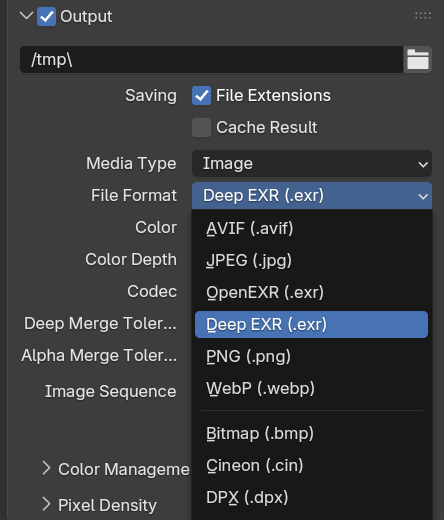
- Set File Format to
Deep EXR. - Configure the color channels, color depth, codec, and merge tolerances in the same panel.
- Set the output path and render normally.
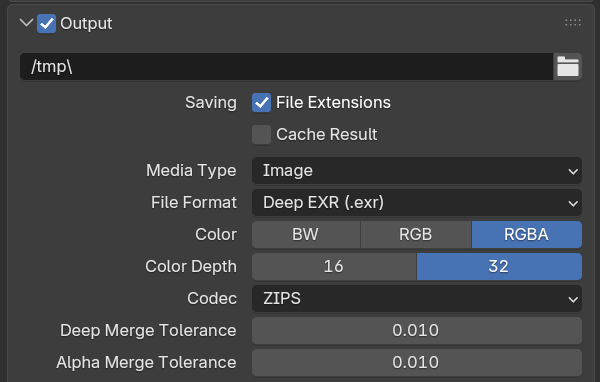
Output Panel Controls
| Control | What it changes | Beginner guidance |
|---|---|---|
| File Format | Selects native Deep EXR output and enables Deep rendering automatically. | Choose Deep EXR. |
| Color | Selects which color channels are stored. It does not change Z or ZBack. | Use RGBA when transparency is required; otherwise RGB is sufficient. |
| Color Depth | Controls RGBA storage only. 16-bit uses half-float; 32-bit uses full-float. Z and ZBack always remain 32-bit float. | Use 16-bit for smaller output or 32-bit for greater color and alpha precision. |
| Codec | Compresses the Deep EXR file. Deep EXR supports None, RLE, and ZIPS. | ZIPS is the general lossless choice. |
| Deep Merge Tolerance | Depth-distance threshold for merging nearby Deep samples. | Default 0.010. Smaller values preserve more separate depth samples. |
| Alpha Merge Tolerance | Alpha-difference threshold used together with the depth tolerance. | Default 0.010. Smaller values preserve more opacity detail. |
Samples merge only when both tolerance tests pass. Color Depth does not change their count or depth position; it only changes RGBA storage precision.
Option B: Compositor File Output
Use this path when the compositor must control the file path, naming, or image sockets.
- Add a File Output node in the compositor.
- In Node Format, select
Image, then set File Format toDeep EXR. - Configure the node's color depth, codec, and merge tolerances.
- Add the required image sockets, connect the render data, and set the output paths.
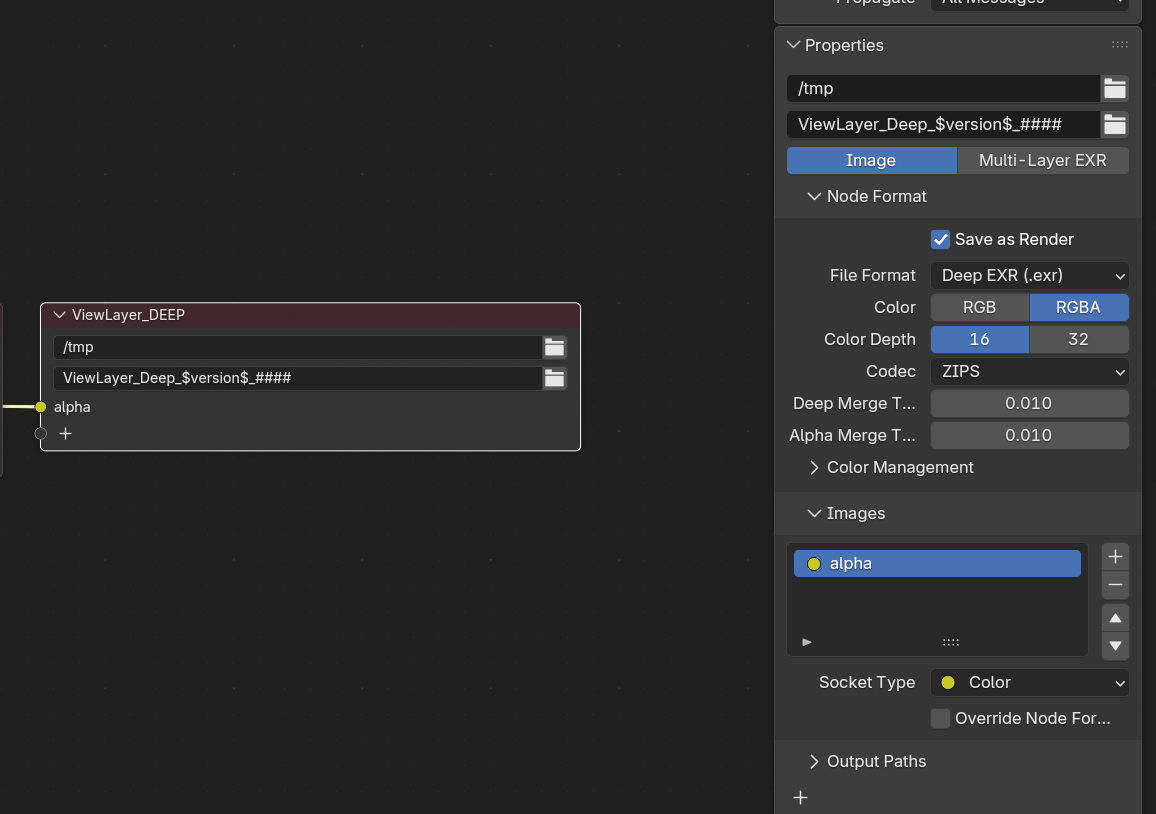
File Output Node Panels
- Node Format — Contains the node-specific Deep EXR format, color depth, codec, and merge tolerances.
- Images — Defines the image sockets written by this node.
- Output Paths — Controls the destination and naming for the node output.
The File Output node stores its own format settings. Changing the scene Output panel does not configure this node.
Render Memory Settings
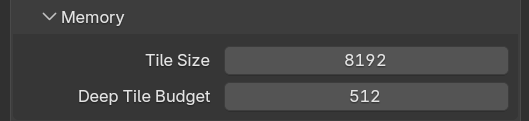
These controls are separate from both output-format locations. Open Render Properties > Performance > Memory while using Cycles.
| Control | What it changes | Default |
|---|---|---|
| Tile Size | Sets the requested render tile dimension for high-resolution rendering. | 2048 px |
| Deep Tile Budget | Limits Deep tile-buffer memory per rendering device. Cycles reduces the effective tile size when necessary to stay within this budget. Set 0 to disable the limit. | 1024 MB |
Deep Tile Budget is a memory limit, not a Deep quality setting. It does not directly reduce depth precision or merge samples.
Nuke Workflow
- Render your scene layers with Deep EXR output enabled.
- Import the
.exrfiles into Nuke usingDeepReadnodes. - Use
DeepMergeto composite layers based on depth. - Use
DeepToImageto flatten the deep data back to a standard image.
TIP
For best results, render each major CG element (characters, environments, effects) as separate Deep EXR layers and merge them in Nuke.
Known Limitations
- Metadata reconstruction — Full deep metadata reconstruction is future work, not part of the current baseline.
- Memory usage — Deep output stores significantly more data than flat EXR. Use the Deep Tile Budget parameter to control the tradeoff.
Future Work
- Sparse/compressed deep storage inspired by MoonRay is a potential future optimization.
- Metadata reconstruction for more complete downstream compositing metadata.
See Also
- Pass & AOV System (API) — How deep passes are registered internally.
- Blender Manual: Output Properties — Standard Blender output settings.