
EXR Overscan
ShippedWhat Is It
EXR Overscan is a rendering feature in Industrial CG Platform that allows Blender Cycles to calculate extra pixel margins outside of the standard delivery frame size.
When exporting to OpenEXR, the engine preserves the standard delivery resolution inside the EXR displayWindow metadata, while writing the larger overscanned canvas bounds into the dataWindow metadata. This ensures that the outer margins are written into the file without crop-scaling or stretching the delivery aspect ratio.
Why Use It
- Downstream VFX Padding — Matches standard VFX pipeline demands by providing extra border padding for lens undistortion, camera shake simulation, and 2D/3D matchmoving in compositing packages.
- Edge Stretch Prevention — Prevents black borders or pixel stretching when matchmove cameras translate, rotate, or reproject plates.
How To Enable
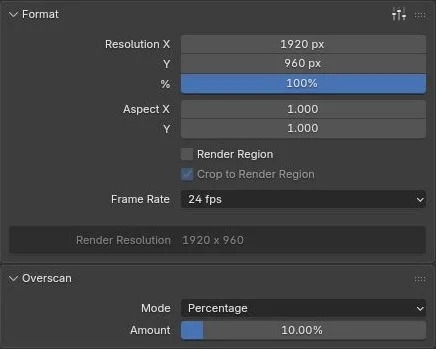
Overscan settings are located in the Output Properties tab, under the Overscan panel (directly below the Format panel).
- Set your Render Engine to
Cycles. - Disable Render Region under the Format panel (Overscan is gated off when Render Region is active).
- Set your active file format to
OpenEXR,OpenEXR Multilayer, orDeep OpenEXR. - Configure your overscan margins in the Overscan panel.
Gating Conditions
The Overscan panel will be greyed out if:
- A non-Cycles engine (Eevee or Workbench) is selected.
- Render Region is enabled.
Parameters
| Parameter | Sizing Mode | Default | Description |
|---|---|---|---|
| Mode | Enum | PERCENTAGE | Sizing calculation method: PERCENTAGE or PIXELS. |
| Amount / Size | Percentage | 0.0 | Sizing percentage (e.g. 10.0 for 10% on all sides). |
| Left / Right / Bottom / Top | Pixels | 0 | Individual margin paddings in pixels (available only in PIXELS mode). |
EXR Window Semantics
To ensure downstream software parses overscanned EXR files correctly, Industrial CG Platform adheres to the official OpenEXR window standards:
- Display Window (
displayWindow): Defines the delivery frame format (e.g.1920x1080with origin(0, 0)). This determines the project resolution inside compositing tools. - Data Window (
dataWindow): Defines the actual bounding box of pixels stored in the file. For a 10% overscan on a1920x1080frame, the data window expands to2304x1464with an offset origin of(-192, -192).
                  Data Window (Overscanned bounds: 2304 x 1464)
    ┌──────────────────────────────────────────────────────────────────┐
    │                                                                  │
    │  (-192, -192)                                                    │
    │         Display Window (Delivery resolution: 1920 x 1080)        │
    │         ┌──────────────────────────────────────────────┐         │
    │         │                                              │         │
    │         │ (0, 0)                                       │         │
    │         │                                              │         │
    │         │                                              │         │
    │         │                                              │         │
    │         │                                  (1920, 1080)│         │
    │         └──────────────────────────────────────────────┘         │
    │                                                                  │
    │                                                      (2112, 1272)│
    └──────────────────────────────────────────────────────────────────┘
When imported into compositors, the file will automatically align to the project's standard delivery format, while the overscan pixels outside the viewport boundaries are preserved inside the bounding box (BBox) and remain accessible for transformations.
Known Limitations
- No Viewport Render Preview — There is no true live overscanned rendered image viewport preview outside the camera frame. The viewport behavior is limited to displaying an outward safety-frame guide overlay.
- Render Region Mutex — Overscan output and viewport guides are disabled when Render Region is active.
- Cycles Only — Non-Cycles renderers do not support overscan.
- Compositor Node Constraints — When rendering through a compositor
File Outputnode, the node group must contain a liveGroup Outputnode to trigger overscan window metadata propagation.
See Also
- RNA Properties (API Reference) — The Python API properties for configuring overscan programmatically.
- Installation Guide — Details on OptiX shader cache isolation.