
Lightgroup Lobe Passes
ShippedWhat Is It
Lightgroup Lobe Passes extend Blender Cycles' light pass system by breaking down each lightgroup into its individual lighting components (lobes). Instead of getting only a combined lightgroup pass, you can now output separate diffuse, glossy, transmission, and volume passes for each lightgroup, with further direct and indirect separation.
This gives lighting artists and compositors the same level of control per lightgroup that Blender already provides at the global level — but isolated to each lighting setup.
Why Use It
- Fine-grained relighting — Adjust individual light contributions by their component type in comp, not just by overall intensity.
- Per-lightgroup breakdown — See exactly how each lightgroup contributes to diffuse, glossy, transmission, and volume independently.
- Aggregate balance — The sum of all per-lightgroup lobe passes reconstructs back to the combined beauty pass, enabling reliable round-trip compositing.
- Production-proven — Validated on real production scenes with area, point, spot, and sun light types.
How To Enable
- Open Properties > View Layer Properties > Passes > Light.
- Create your lightgroups as normal.
- Check Light Pass AOVs to enable per-lightgroup lobe pass output.
- Select which lobe components you want:
- Diffuse (Direct / Indirect)
- Glossy (Direct / Indirect)
- Transmission (Direct / Indirect)
- Volume (Direct / Indirect)
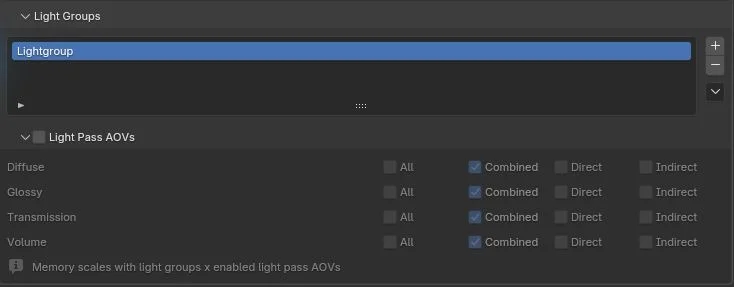
Output Naming Convention
Each lightgroup lobe pass is named following this pattern:
<Lobe>_<Direct|Indirect>_<LightgroupName>For example, with a lightgroup named key:
| Pass Name | Content |
|---|---|
Combined_key | Combined lightgroup pass |
Diffuse_Direct_key | Direct diffuse from key lights |
Diffuse_Indirect_key | Indirect diffuse from key lights |
Glossy_Direct_key | Direct glossy from key lights |
Glossy_Indirect_key | Indirect glossy from key lights |
Transmission_Direct_key | Direct transmission from key lights |
Transmission_Indirect_key | Indirect transmission from key lights |
Volume_Direct_key | Direct volume from key lights |
Volume_Indirect_key | Indirect volume from key lights |
Aggregate Balance
The lobe passes are designed so that:
Combined_<lg> ≈ Σ (Lobe_Direct_<lg> + Lobe_Indirect_<lg>)for each lightgroup. This means:
- Emissive mesh lightgroups are combined-only by design (no lobe split).
- Finite lights (area, point, spot, sun) fully reconstruct through their lobe passes.
- World/environment lightgroups correctly write lobe passes even when
Background passandEmission passare disabled in the view layer.
Compositor & Nuke Workflow
In Blender Compositor
- Connect a Render Layers node.
- Each lightgroup lobe pass appears as a separate output socket.
- Use standard compositor nodes to adjust individual lobe contributions.
In Nuke
- Import the multilayer EXR using a
Readnode. - Each lightgroup lobe pass appears as a separate layer/channel in the EXR.
- Use
Shufflenodes to isolate and grade individual lobe contributions. - Sum them back together for the final relit beauty.
TIP
A useful compositing check: the sum of all lightgroup lobe passes (plus emissive Combined_<lg> passes) should closely match the overall rgba beauty pass.
Known Limitations
- Emissive meshes — Emissive mesh lightgroups remain combined-only and do not split into direct/indirect lobes. This is by design.
- Full arbitrary LPE — Full Light Path Expression syntax is future work. The current system provides the most commonly needed lobe breakdown.
See Also
- Pass & AOV System (API) — Internal pass registration and readback architecture.
- Cycles Kernel Extensions (API) — Kernel-level lightgroup split index data.
- Blender Manual: Light Groups — Standard Blender light group documentation.