
Shadow Color
ShippedWhat Is It
Shadow Color adds a per-light and per-world color property to Blender Cycles that tints the shadow regions cast by each light source. Instead of shadows being purely the absence of light, you can give them a specific color — a common artistic technique in film and animation lighting.
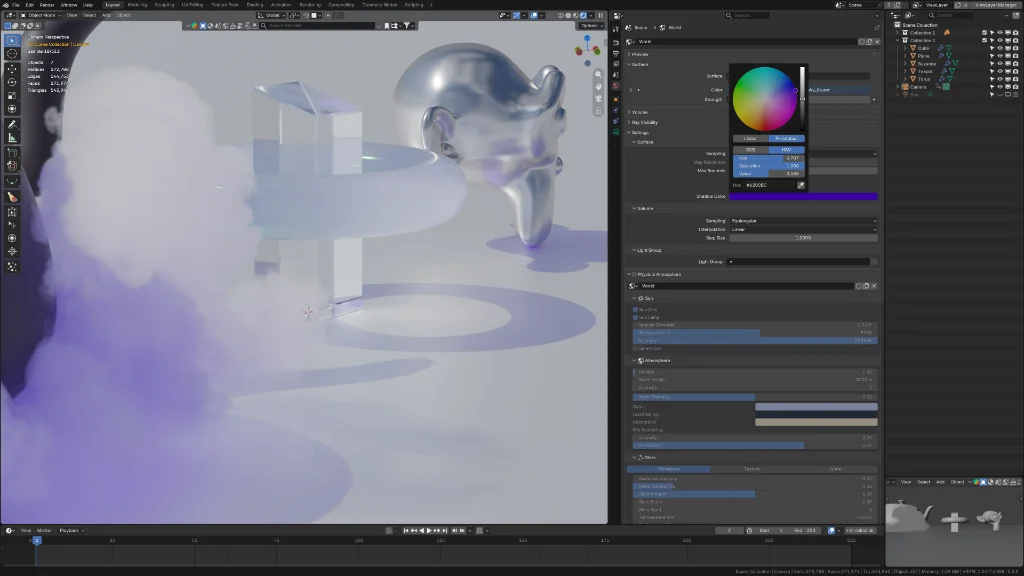
Why Use It
- Artistic control — Match the shadow tint to your color script without affecting the light color itself.
- Per-light granularity — Different lights can cast differently colored shadows in the same scene.
- World shadow color — The world lighting can also have its own shadow color.
- Non-destructive — Shadow color only affects shadow regions; lit areas remain unchanged.
How To Enable
Per-Light Shadow Color
- Select a light in the viewport.
- Open Properties > Object Data Properties (light icon).
- Find the Shadow Color property.
- Click the color swatch to choose a shadow tint color.
World Shadow Color
- Open Properties > World Properties.
- Expand Settings > Surface.
- Find the Shadow Color property.
- Set the desired world shadow tint.
Artistic Use Cases
| Scenario | Shadow Color | Effect |
|---|---|---|
| Warm sunset scene | Blue / purple shadows | Cool contrast against warm light |
| Underwater scene | Deep teal shadows | Reinforces depth and water color |
| Stylized animation | Saturated complementary | Bold, graphic shadow look |
| Moonlight | Deep blue shadows | Classic night exterior feel |
TIP
Start with subtle, desaturated shadow colors. A little tint goes a long way. The effect is most visible in areas of soft shadow falloff.
Known Limitations
- Shadow color affects the shadow contribution of the specific light only. It does not alter the shadow behavior of other lights in the scene.
- The effect is purely additive color in the shadow region — it does not simulate colored translucent shadow casters.
See Also
- RNA Properties (API) —
Light.shadow_colorandWorld.cycles.shadow_colorproperty reference. - Blender Manual: Light Properties — Standard Blender light settings.